

Neural DSP Archetype Petrucci for macOS
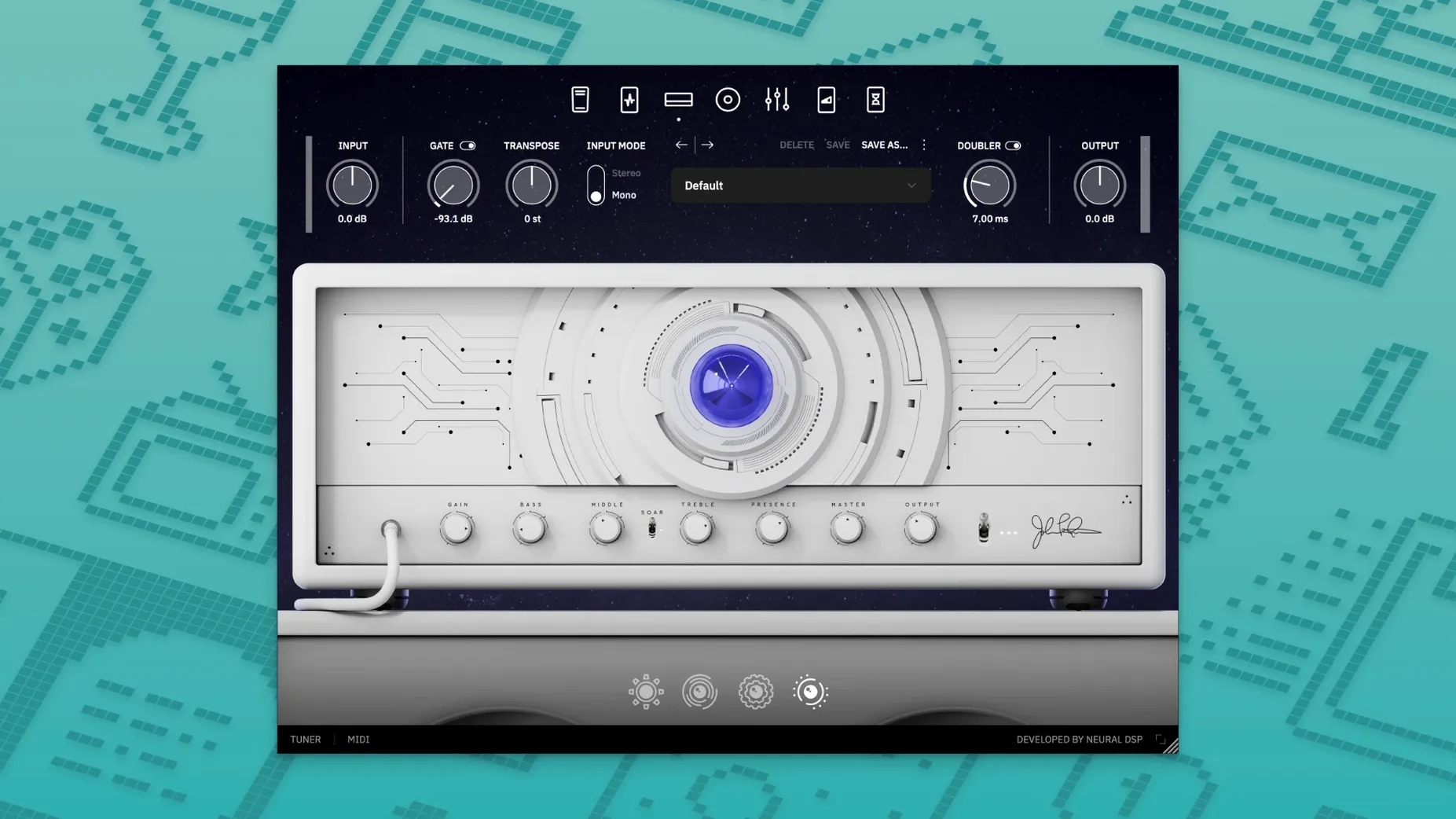
The 1.0.0 installer landed on November 21, 2024, marking the first release of this Archetype-series plugin. It’s built around John Petrucci’s signal chain and runs as a 64-bit AU, VST3, or AAX plug-in on macOS 10.15 and later.
Built for high-gain purists and Quad Cortex owners on Apple Silicon
- Players who want a focused high-gain toolchain without endless menu-diving.
- Quad Cortex owners — the official page lists full compatibility with both QC and QC mini.
- Apple Silicon studios; the binary is native, no Rosetta translation needed.
Version 1.0.0 ships without preset migration or multilingual support
- Version 1.0.0 is the debut release, so the feature set is exactly what’s on the tin — no legacy preset migration path exists yet.
- The interface ships in English only.
- As part of the Archetype line, it assumes you’d rather shape tone with a few well-chosen controls than stack twenty modules.
Imagine a session player who gets a late-night email: the producer wants the solo re-tracked with a darker, more vocal midrange and less pick attack. Not a full re-amp job — just a targeted tonal shift that sits in the pocket of a dense mix. Opening Archetype Petrucci inside Logic, they pull up the default amp and cab pairing, back the treble off a couple of notches, and nudge the built-in overdrive’s tone control until the transients soften without losing articulation. Fifteen minutes later the DI track has a finished tone that slots under the vocal without a single EQ move in the channel strip. That’s the kind of scenario where the restrained control set earns its keep: fewer knobs, but each one moves the sound somewhere useful immediately.
Everything’s new, but the flat preset browser stands out after a few hours
Since this is the initial release, there’s no changelog of fixes or tweaks to pore over — everything is new. A few things stand out once you’ve spent a couple of hours with it:
- Preset browsing is flat but fast. The factory bank loads in a single list. No artist packs or expansion folders to navigate yet, which means you can arrow-key through the whole set in under a minute and know exactly what the plugin ships with.
- The gain structure is genuinely Petrucci. It’s not a generic high-gain model with his name on it. The amp section compresses the way a Mark series head does under heavy picking, and the noise floor stays civil even with the drive dimed — useful when you’re monitoring through headphones and every hiss counts.
- Standalone mode works without a DAW. On macOS you can launch it as a regular application for practice or quick tone-hunting. It grabs the first available audio interface and runs with low enough latency that a few minutes of warm-up doesn’t require booting a full session.
Double-click any knob to reset it instantly
- Double-click to reset any knob. It’s a Neural DSP house convention by now, but if you’re coming from another plugin ecosystem you might not discover it for weeks. Double-click any parameter and it snaps to its default value — handy when you’ve twisted the bass out of shape and want a clean slate without reloading the preset.
- Input and output meters with peak hold. The small meter bar at the top isn’t just cosmetic. Click it to clear the peak indicator, and it’ll catch clipping you might not hear during a quick riff check.
- Undocked cab section works as a separate IR loader. You can disable the amp entirely and use just the cabinet and microphone section on a pre-recorded track — a lightweight way to audition different mic blends without adding a dedicated IR plug-in.
- Scroll-wheel support on macOS. Hover over any control and use the mouse wheel or trackpad scroll for fine adjustments. Hold Shift while scrolling to move in smaller increments, which matters when you’re dialing in delay time by ear.
Dial in a 128-sample buffer before you play a note
Open the standalone app or an empty DAW track, load the default preset, and make three changes that’ll pay off every session:
- Set the buffer size to 128 samples or lower. The native Apple Silicon build handles low buffers gracefully. On an M1 or M2 machine you can usually drop to 64 samples without crackles, which makes the standalone mode feel like a hardware modeler.
- Switch the gate from the default threshold to a lower value. The noise gate ships with a fairly aggressive setting that can choke sustained notes at bedroom volumes. Back it off until the hum disappears but the note tails ring out naturally.
- Save a “flat cab” user preset. Pick the cab and mic combination that gives you the most neutral starting point — usually one of the dynamic mics at center position — and save it as a user preset called
Flat Start. When you’re building a tone from scratch, loading that preset skips the guesswork of whether you’re fighting a baked-in mic color.
Where the AU, VST3, and AAX files land on your Mac
The installer drops a standard .component for AU, a .vst3 bundle, and an .aaxplugin for Pro Tools into their expected locations — no custom library paths to hunt down. If you’re running Logic Pro, the plug-in appears in the Audio Units manager under “Neural DSP” immediately after the first launch scan. GarageBand picks it up the same way, though the stripped-down UI means you won’t see the full meter bar there.
Quad Cortex integration is the deeper hook. Patch compatibility runs both directions: you can capture a tone on the desktop and push it to a QC or QC mini for stage use, or pull a floorboard preset back into the DAW for re-amping. The transfer happens over USB via the Cortex Control app, and the block-for-block architecture maps cleanly since both platforms share the same component models. It’s one of the few plug-in ecosystems where the hardware and software genuinely mirror each other rather than offering a “lite” version on one side.
On the macOS side, the plug-in plays nicely with system-level features you wouldn’t necessarily expect. It respects Dark Mode automatically — the interface doesn’t blind you during a late-night session. Audio MIDI Setup sees the standalone app as a distinct client, so you can route it to different output pairs than your DAW without switching interfaces. And if you use macOS’s built-in screen scaling on a Retina display, the vector-based UI remains crisp at any resolution; no blurry bitmaps even on a 5K monitor at 2560×1440 logical pixels.
For users who build effect chains across multiple plug-ins, the VST3 version exposes sidechain inputs that some DAWs recognize, though the plugin itself doesn’t process sidechain audio — it’s a quirk of the format wrapper worth knowing if you see unexpected routing options in your DAW’s plug-in header. The AU version, by contrast, presents a cleaner I/O configuration that avoids confusion in hosts like Ableton Live that enumerate every possible bus. If you’re looking for a neural dsp plugin free download or a neural dsp mac os crack, you might stumble across the Archetype John Mayer or a neural dsp bundle mac crack along the way, and a neural dsp torrent can ship with different wrapper versions — to get the 1.0.0 release’s native Apple Silicon binary loading correctly, just verify the bundle structure matches the original layout.
- Initial 1.0.0 release for Windows and macOS — first public build of the Archetype Petrucci plugin.
- macOS 10.15 or later
- 64-bit Intel or Apple Silicon Mac
- Native Apple Silicon support included
Comments 0
Sign in or create an account to leave a comment.
No comments yet. A codec, a slice, a machine — they appear after moderation.
More in VST Plugins
cd ../ Neural DSP Archetype Rabea X
VST Plugins 742 MB
 Neural DSP Parallax X
VST Plugins 179 MB
 Neural DSP Soldano SLO-100 X
VST Plugins 340 MB
 Native Instruments Noire KONTAKT
VST Plugins 14.7 GB
 Native Instruments Massive X
VST Plugins 1.6 GB
 noteGRABBER
VST Plugins 35 MB
 Nudist Audio Nudistort
VST Plugins 45 MB
 oeksound soothe2
VST Plugins 128 MB