
Neural DSP Parallax X for macOS
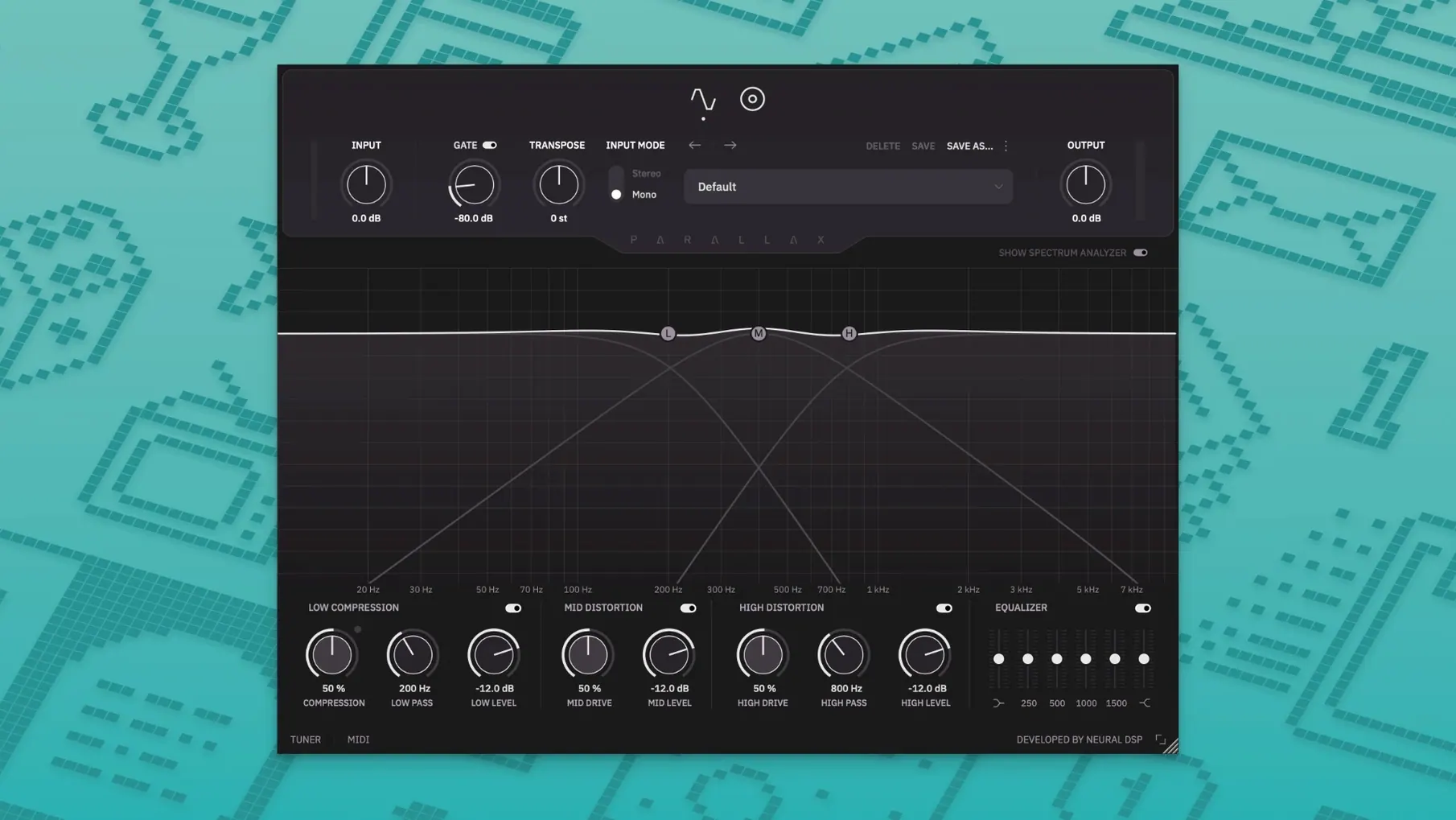
The compressor in the low band alone changes how you approach a mix. Parallax X processes bass by splitting the signal into low, mid, and high bands—then routes the mid and high through a tube-modeling stage before everything hits the cabinet section, which only touches those upper two bands. You get independent distortion character on the definition and clank without muddying the sub frequencies.
- Low-band compressor tuned specifically for bass frequencies—tightens the fundamental without squashing note attack.
- Mid and high distortion driven by tube-modeling, with separate controls so you can add grind to the mids while keeping highs articulate.
- Cabinet emulation applied only to the mid and high bands, with six virtual microphone options to shift the room sound.
- Standalone mode with a built-in metronome that controls time signature, accent pattern, and note length—useful for practice sessions without a DAW.
- Transpose and Live Tuner added in this version, sitting alongside a redesigned spectrum analyzer that shows exactly what each band is doing.
Because the cab never touches the lows, the bottom stays clean no matter how much breakup you dial into the upper bands. That parallel architecture is the core idea—dirty up the character frequencies while the sub remains a solid, compressed anchor.
Dialing in a clanky rock bass tone from scratch
Say you’ve tracked a P-bass with roundwound strings through a clean DI. The raw signal has plenty of fundamental but lacks the pick attack and growl needed for a dense rock mix. Here’s one way to shape it inside Parallax X without reaching for other plugins.
- Load Parallax X on the bass channel. Engage the Live Tuner first—the metronome can wait—and check tuning while the DI plays back. Even a few cents off blurs the mid distortion later.
- Open the Spectrum Analyzer and watch where the low energy peaks. For a P-bass in standard tuning, the fundamental usually sits around 40–80 Hz. Set the crossover between low and mid so the compressor grabs that region and leaves the 200–800 Hz body alone.
- Dial the low-band compressor for about 4–6 dB of reduction on sustained notes. Keep the attack fast enough that the initial transient punches through; release long enough that the note doesn’t pump. You want the sub anchored, not flattened.
- Bring up the mid distortion gradually while listening on small speakers or an Auratone-style reference. When the bass starts cutting through even at low volumes, stop. Back off if the low-mids get boxy—the six-band EQ sits after the distortion and can scoop 300 Hz if needed.
- Add a touch of treble distortion for string noise and fret clank. Blend it in conservatively; the cab emulation later will soften the fizz. I usually run treble drive at half the mid drive level.
- Pick a cabinet and microphone combination. A dynamic mic model close to the cone adds midrange poke; a ribbon pulled back smooths the top end. Since the cab only processes mid and high bands, the low end stays exactly where you set it in step three.
- Use the six-band graphic EQ for final cleanup—cut around 125 Hz if the room has a node, boost 800 Hz for more pick definition, roll off above 4 kHz if the cymbals are fighting the bass.
- If the song is tuned down a half-step, engage Transpose at -1. The processing stays consistent because the pitch shift happens before the band split.
Alt-click shortcuts worth finding on day one
The redesigned interface hides a few workflow accelerators that aren’t shouted about in the feature list. Here are the ones worth knowing on day one.
- Alt-click any EQ band to reset it to zero. The six-band graphic gets wide fast when you’re sculpting; this avoids hunting for the flat position with the mouse.
- The spectrum analyzer is per-band. Click the low, mid, or high tab above the display to isolate that band’s frequency content. Useful when you’re trying to see exactly where the mid distortion is adding harmonics relative to the dry signal.
- Factory presets store cab and mic choices per snapshot. Browsing presets with the cab section visible reveals how different tones lean on specific mic models—faster than reading a manual.
- The standalone metronome remembers your last settings between sessions. If you practice with odd time signatures, you won’t re-enter 7/8 every time you launch.
- Legacy Parallax presets import automatically. The installer copies them into the Parallax X user folder, so old session recall doesn’t break. Both plugin versions coexist in your DAW—Parallax X appears as a separate entry.
Who can build a finished bass tone before hitting record
Parallax X isn’t a general-purpose channel strip, and it doesn’t try to be. The parallel architecture makes it a focused tool, and certain workflows benefit more than others.
Bass players who track at home and want a finished tone before the DI hits the DAW will lean on the standalone mode. The metronome, tuner, and transpose features turn it into a self-contained practice and recording front-end. Dial in a tone, open your DAW, set the input to the Parallax X standalone output, and print the processed signal. No amp sims, no re-amping.
Mix engineers working with dense rock or metal arrangements get the most from the split-band distortion. Guitars occupy the same midrange real estate as bass overdrive, and the independent mid and treble controls let you carve distortion into a frequency pocket that doesn’t mask the guitars. The cab section applied only to the upper bands means you can push saturation harder without the low end collapsing—something you can’t replicate with a single-band saturator followed by EQ.
Live performers using a laptop rig benefit from the AU and VST3 formats plus native Apple Silicon support. The transpose control handles drop-tuning changes without swapping basses between songs. And because the plugin processes in real time with low latency on modern Mac hardware, it sits comfortably in MainStage or a lightweight VST host without glitching under stage conditions.
Producers who lean on neural dsp torrent downloads to try before committing often start with the standalone version first—no DAW setup required, just launch and play. The same applies to anyone grabbing a neural dsp mac torrent to test compatibility with their interface. Once the tone is dialed in, moving to the AU or VST3 version inside a session is straightforward, and the preset format transfers between modes.
- Transpose, Live Tuner, and a built-in metronome added to the standalone mode and plugin.
- Redesigned Spectrum Analyzer with per-band visualization.
- New factory presets and a fully revamped interface.
- macOS 11 or later
- Apple Silicon or Intel processor (64-bit)
$ man neural-dsp-parallax-x | grep -A2 "?"
Does Parallax X run natively on Apple Silicon Macs?
Yes, version 1.0.0 includes native Apple Silicon support alongside Intel builds, both as a plugin and in standalone mode.
Comments 0
Sign in or create an account to leave a comment.
No comments yet. A codec, a slice, a machine — they appear after moderation.
More in VST Plugins
cd ../ Neural DSP Archetype Rabea X
VST Plugins 742 MB
 Neural DSP Soldano SLO-100 X
VST Plugins 340 MB
 Neural DSP Archetype Petrucci
VST Plugins 745 MB
 Native Instruments Noire KONTAKT
VST Plugins 14.7 GB
 Native Instruments Massive X
VST Plugins 1.6 GB
 noteGRABBER
VST Plugins 35 MB
 Nudist Audio Nudistort
VST Plugins 45 MB
 oeksound soothe2
VST Plugins 128 MB