Plugin Alliance Shadow Hills OptoMax for macOS
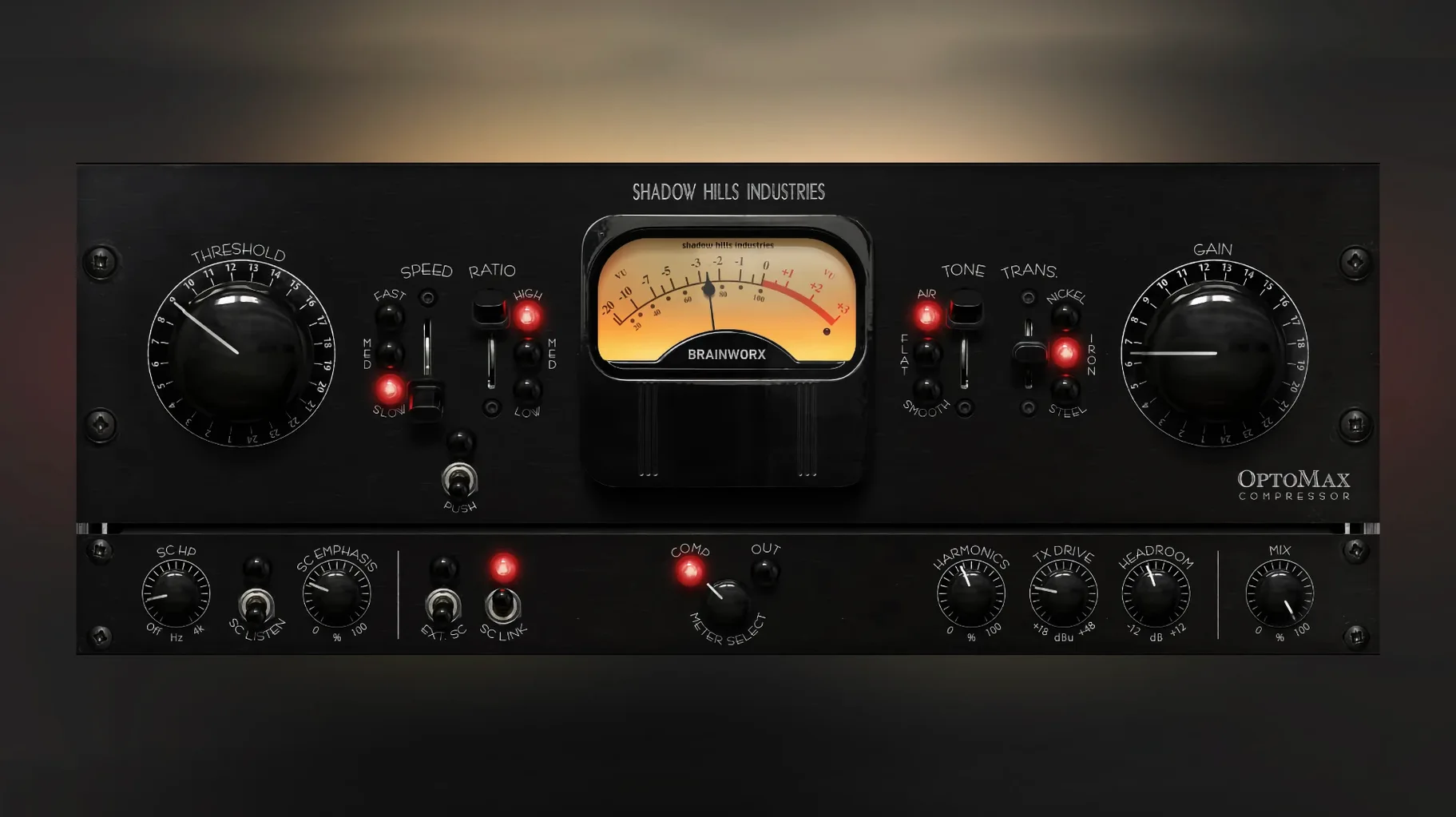
Shadow Hills OptoMax is an optical compressor plugin that isolates the opto-cell character from the renowned mastering hardware.
Opto compression — A light-dependent resistor and an internal light source control the gain reduction, giving a smooth, program-dependent release curve.
Transformer models — Switch between Nickel (clean, open), Iron (weight, body), and Steel (aggressive, direct) to saturate the signal path differently.
Shine — A high-frequency emphasis circuit that brightens the signal before it hits the detector, keeping top-end detail from being dulled by compression.
Response — A three-position switch sets the timing personality to Slow (gentle leveling), Medium, or Fast (peak control), mimicking the behavior of the original hardware's optical section.
Did the full transformer trio ship from day one?
The initial drop — version 1.0.0 — shipped on 18 September 2025 with the full feature set active right out of the installer. There was no staggered rollout of transformer models or sidechain filtering; everything from the Nickel/Iron/Steel trio to the parallel mix knob landed at once. For a .0 release, the stability was unusually boring, which is exactly how plugin releases should be.
Version 1.0.1 followed quietly with a single targeted fix: the gain reduction meter in Pro Tools had been misreporting values. If you work primarily in Logic or Ableton Live, you probably never saw the bug. For Pro Tools users, the meter now tracks what the opto-cell is actually doing, which matters when you're chasing a specific dB of reduction on a vocal or drum bus and the visual feedback was previously lying to you.
No feature additions, no UI reshuffles, no breaking changes to recall. Both versions share identical preset compatibility and sound identical. The version bump was purely a monitoring correction for one DAW.
How does it smooth a lead vocal without flattening the performance?
Here's how a first real session with it usually plays out — pulled from a hypothetical afternoon mix where the lead vocal needs evening out without losing its dynamic shape.
You insert OptoMax on the vocal channel after any corrective EQ but before your de-esser. The default state loads with the Nickel transformer, Response at Medium, and the threshold set so it's barely kissing the loudest phrases. Gain reduction hovers around 2–3 dB on peaks. You loop the chorus — the loudest part of the performance — and start listening.
First move: you switch Response to Slow. The release breathes more, letting syllables trail off naturally instead of clamping down. On a ballad, this often stays. On a denser pop track, you might flip it to Fast for a more controlled, in-your-face envelope. There's no right setting across all material; the three-position switch gives you three distinct timing curves, and you audition all of them per source.
Next, you try Iron on the transformer. The vocal gains a subtle low-mid density — not distortion, more like a gentle thickening around 200–400 Hz that helps a thinner voice sit in a busy arrangement. If the track already has weight from the microphone chain, Nickel stays. If the vocal needs to cut through distorted guitars, Steel adds an edge that pushes it forward without raising the fader.
Shine goes on next. You pull up the high-frequency emphasis a few dB. Syllables that were getting slightly muted by the compression now stay articulate — sibilance remains present without becoming harsh, because Shine feeds the detector, not the audio path directly.
The parallel mix control gets dialed back to around 70% wet. You're now blending the compressed signal with the dry input, which preserves the natural dynamic swings of the verse while still evening out the chorus. On a full drum bus, you might go even lower — 40–50% — to let transients through while taming the sustain.
Sidechain filtering finishes the job. You engage the high-pass filter on the detector at 120 Hz so the kick drum doesn't make OptoMax clamp down on the entire drum group every time it hits. The compression now reacts to the snare, toms, and cymbals while ignoring sub energy.
By the end of the pass, you've got a vocal that sits without automation rides, a drum bus that breathes, and no obvious "compressed" artifacts. That's the opto-cell doing its program-dependent thing: the release curve isn't a fixed exponential, it shifts with the material.
Why start with no transformer, then add Nickel?
After installing the .pkg from the disk image and letting your DAW scan the AU and VST3 components, a few habits make the first week smoother.
Start with no transformer, then add it. The Nickel model is the cleanest and closest to what the optical cell does on its own. Dial in your compression first — threshold, ratio-like behavior from the input drive, timing via the Response switch — with Nickel engaged. Then cycle through Iron and Steel. Switching transformers after setting the compression lets you hear what the saturation contributes separately from the gain reduction. It stops you from compensating for the Iron model's low-end bump by over-thresholding, which is easy to do when you dial both in simultaneously.
Use Shine before you decide the track is dull. When an opto compressor tames peaks, it can soften transients in the top end. Shine counteracts that before the detector sees the signal, so the compressor still works on the full-bandwidth signal but doesn't darken it. Engage it early in your gain-staging, not as a fix after you've already printed a dull take.
Parallel mix as a macro control. Instead of tweaking threshold and makeup gain to get the blend right, set OptoMax for slightly more compression than you think you need — say 5–6 dB of reduction — then back the mix knob to 50–60%. You get the density of heavy compression with the dynamic range of light compression. On a full mix bus, this trick often sounds more transparent than chasing a perfect threshold.
Label your presets by source, not setting. "Vocal – Iron – Slow" is more useful to future you than "Opto Setting 3." The transformer and Response choices are source-dependent decisions; save presets that encode both, and you'll recall intent faster when reopening a project weeks later.
Where OptoMax fits in a Mac workflow
OptoMax is an AU and VST3 plugin, so it slots into any DAW that supports those formats — Logic Pro, Ableton Live, Reaper, Cubase, and Pro Tools (via the AAX version included in the same installer). On Apple Silicon machines running macOS 12 or later, it loads natively without Rosetta overhead, which keeps session recall fast and CPU usage predictable even with multiple instances across a mix.
It pairs naturally with other Brainworx and Plugin Alliance tools if you've already got them installed. A typical chain might be: bx_console for preamp color and EQ into OptoMax for optical leveling, then out to a limiter on the master bus. The transformer models in OptoMax don't duplicate what a console emulation does — they're subtle saturation circuits tuned to the compressor's output stage, so stacking them with a channel strip doesn't feel redundant.
When hunting for specific sounds, you'll sometimes see phrases like shadow hills mastering compressor mac pop up in download listings. OptoMax isn't the full Mastering Compressor — it doesn't include the discrete VCA section or the multi-stage topology — but it pulls the optical path out of that box and gives you independent control over it. If you've used the opto section inside the hardware or the full plugin emulation, the Response switch and transformer options here will feel immediately familiar.
On the macOS side, OptoMax integrates with Audio Unit host features like Logic's low-latency monitoring mode and the system-wide Audio MIDI Setup routing. There's no standalone application — it's a plugin only — so you'll always instantiate it inside a DAW. Preset management follows the standard AU and VST3 conventions: presets saved from Logic appear in Logic's library, while presets saved from the plugin's own preset browser are portable across hosts.
For producers who lean on the Finder for organization, the component file lives in /Library/Audio/Plug-Ins/Components
- Initial release of the optical compressor plugin.
- macOS 12 or later
- Intel or Apple Silicon processor
$ man plugin-alliance-shadow-hills-optomax | grep -A2 "?"
What are the VST and AU plugin formats available?
The plugin ships as a.dmg installer and delivers standard AU, VST3, and AAX Native formats, running natively on both Intel and Apple Silicon Macs under macOS 12 and later.
What was fixed in the immediate follow-up version?
Version 1.0.1 is listed on the developer's site with a note that it corrected a Pro Tools gain reduction meter issue; the initial 1.0.0 release is otherwise functionally identical for most hosts.
Comments 0
Sign in or create an account to leave a comment.
No comments yet. A codec, a slice, a machine — they appear after moderation.