

Pulsar Audio IPA for macOS
What do the three VCA modes do?
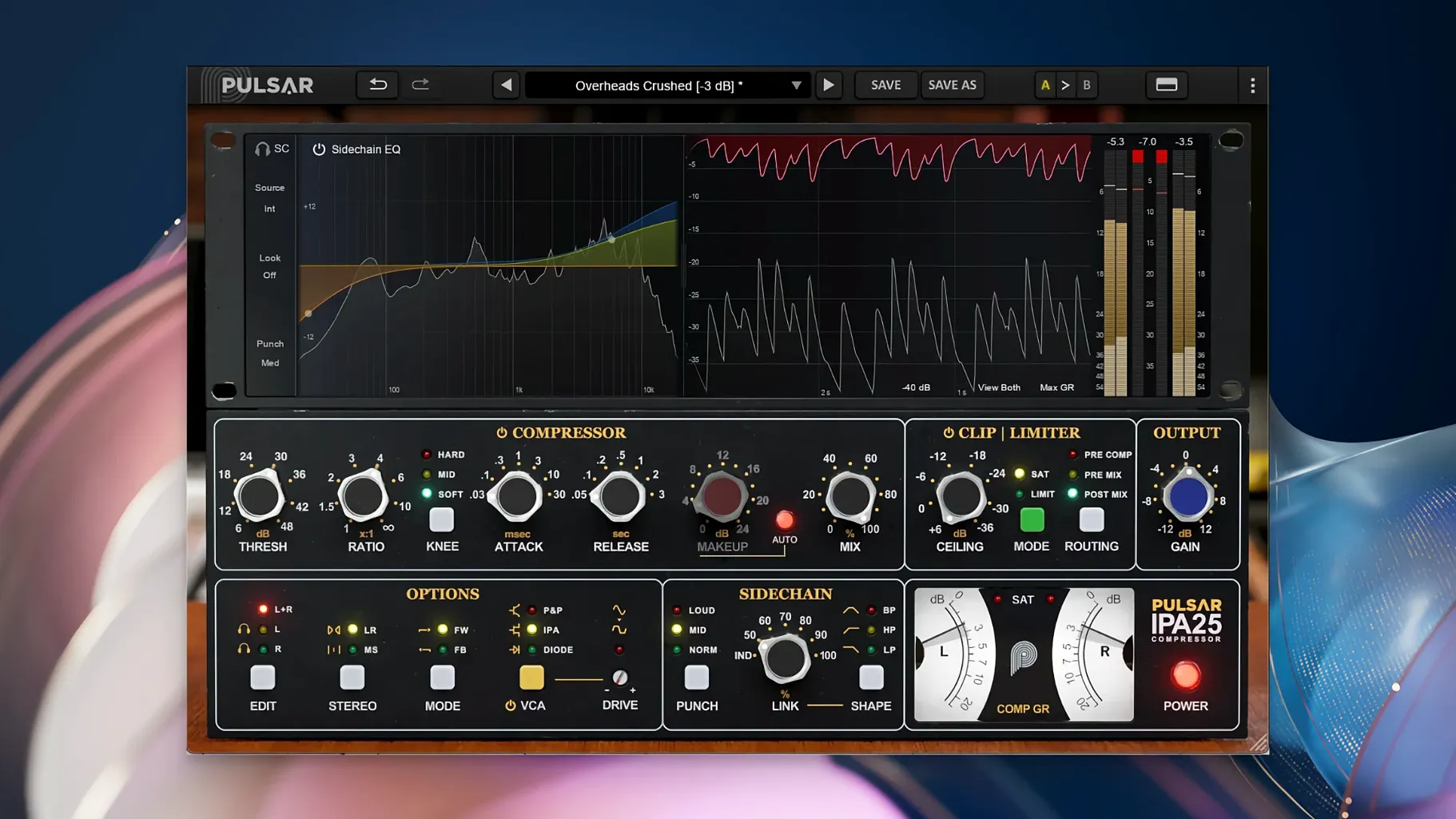
The IPA mode gives you a feed-forward response that's fast and snappy, P&P/Mu switches to a program-dependent feedback design for glue, and Diode mimics the softer knee and release curve of a diode-bridge gain stage. Switching between them changes how the envelope rides the signal, not just the tone.
How does the visual sidechain EQ work?
Instead of a hidden filter section, you get a graph right on the front panel where you can shape what the detector hears. Drag a high-pass shelf to stop the kick from pumping the whole mix, or carve a narrow dip so sibilance doesn't clamp down the vocal bus.
What does Mid/Side processing bring to the table?
It splits the compression into two independent chains for the center and the sides. You can tighten the middle without squashing the stereo ambience, or clamp the wide elements while leaving the lead vocal and bass intact.
Which genres sit well with this processor?
The topology works across rock, pop, and electronic material. The feed-forward mode handles punchy transients on drums, the feedback mode glues a mix bus without collapsing the depth, and the sidechain filtering keeps low-end heavy productions breathing.
What settings are worth changing right away?
The default state is a clean slate, but a few quick tweaks make the plugin feel more like a console than a utility. First, engage the internal clipper at the output stage — it catches stray transients before they hit your DAW’s meter and lets you drive the make-up gain harder without redlining the channel. Second, switch the VCA mode to P&P/Mu and leave it there while you dial in the overall character on a drum bus or mix bus; it’s the most forgiving starting point and teaches your ears what the compressor wants to do. Third, pull up the sidechain EQ graph and add a gentle high-pass at around 100 Hz, even if you don’t think you need it — the detector almost always overreacts to sub energy on full-program material.
The limiter section sits after the clipper in the signal chain. Turning it on with a fast release and a threshold just below the clipper ceiling creates a two-stage safety net that sounds louder than a single brickwall limiter at the same peak level. It’s one of those things that takes thirty seconds to set and then you forget it’s there.
What small conveniences do people miss?
The sidechain EQ graph has a hidden trick: double-clicking a node resets it to flat, but holding Shift while dragging locks the frequency and lets you adjust gain alone. That speeds up notch work on vocal sibilance or a resonant snare ring. The graph itself uses a logarithmic frequency scale, so a small drag in the low end covers more ground than the same movement up high — something that catches first-time users off guard.
The three VCA mode buttons are not just a tone switch; they change the timing behavior enough that your threshold and ratio settings from one mode rarely translate directly to another. If you’re auditioning modes on a mix bus, expect to rebalance the input gain each time or you’ll compare apples to unevenly compressed oranges. The plugin’s internal metering switches between gain reduction and output level with a single click on the meter display, which is easy to overlook when the obvious VU-style needle grabs your attention.
Another small win: the AAX, AU, VST2, and VST3 bundles all install from the same .pkg on a Mac, so you don’t have to pick formats during setup. If you’re hunting for a pulsar vocal studio mac torrent or a pulsar audio ipa package, just know the installer places everything in the standard system folders — /Library/Audio/Plug-Ins/Components for AU, /Library/Application Support/Avid/Audio/Plug-Ins for AAX — and the plugin shows up in your host without extra authorization steps.
One dynamics plugin for bus compression, drum crushing, and vocal leveling
Mix engineers working on Apple Silicon machines who need one dynamics processor that covers bus compression, drum parallel crushing, and vocal leveling without loading three different plugins. The three VCA modes and the Mid/Side routing mean you can keep instances to a minimum, which matters on a laptop session with fifty tracks. Someone mixing a dense pop production can set the mid channel to Diode mode for a softer glue on the center elements while running the sides through IPA mode to keep the stereo width punchy — all inside a single insert slot.
Electronic producers benefit from the sidechain EQ’s precision when ducking a bass line against a kick. Instead of a generic high-pass, they can draw a narrow bell cut at the fundamental frequency of the kick and leave the sub-bass energy below it untouched, so the compressor only reacts to the exact transient overlap. The clipper-limiter combo also suits loudness-conscious genres where a clean master bus peak shaper saves headroom before the final limiter.
If you’ve grabbed a pulsar ipa 25 build or stumbled across a pulsar audio ipa 25 mention alongside a pulsar vocal studio torrent, the version you want for Apple Silicon is 1.0.9 — it runs natively on ARM without Rosetta overhead, which keeps the latency low enough for tracking scenarios where you want compression committed lightly on the way in. Post-production users working with dialogue or Foley won’t find it purpose-built for that task, but anyone mixing music with a need for a VCA-style glue box that doesn’t choke on complex sidechain routing will settle in quickly.
- macOS 11 or later
- Apple Silicon or Intel 64-bit processor
- A 64-bit DAW that hosts
VST 2.4,VST 3,Audio Unit, orAAX Native
$ man pulsar-audio-ipa | grep -A2 "?"
What plug-in formats does Pulsar Audio IPA run in?
It ships asVST 2.4, VST 3, AAX Native, and Audio Unit. You load it inside any 64-bit DAW that supports those formats on macOS 11 and later.
Is it a model of a specific hardware compressor?
It follows the API 2500-style VCA concept, but Pulsar added three switchable detection modes and a visual sidechain EQ that go beyond a straight clone.
Comments 0
Sign in or create an account to leave a comment.
No comments yet. A codec, a slice, a machine — they appear after moderation.
More in VST Plugins
cd ../ Plugin Alliance Shadow Hills OptoMax
VST Plugins 73 MB
 Plugin Alliance Brainworx Bundle
VST Plugins 2.1 GB
 RC-20 Retro Color
VST Plugins 170 MB
 reFX Nexus
VST Plugins 72 MB
 Revoice Pro
VST Plugins 39 MB
 RipX DAW Pro
VST Plugins 1.6 GB
 Roland Cloud Legendary Series
VST Plugins 1.3 GB
 Roland ZENOLOGY Pro
VST Plugins 1.8 GB